Field-Tested: Panasonic S1 II with 24–60 mm F2.8 Lens


After comparing countless mirrorless systems, one thing is apparent. There are no perfect cameras. You might fantasize about combining Olympus-level ergonomics, Sony dynamic range and lowâlight prowess, Fujifilm natural color science, and Sigma optical precision-but the stepâup market has closed many of these gaps. The flagship mirrorless bodies of today excel across ISO performance, autofocus speed, and video features. The real question is which blend of strengths best fits your workflow.
Panasonic S1 II First Glance Takeaways

- Professional Build: The magnesium alloy body feels rockâsolid and weatherâsealed. It is heavier than typical mirrorless but inspires confidence on rugged shoots.
- Ergo + Controls: The dialâheavy layout is a throwback to pro DSLRs. Menus run deep-so assign frequently used functions to the Fn buttons early on.
- EVF & Screen: That 5.76â¯Mâdot viewfinder is bright, sharp, and usually lagâfree. The multiâaxis tilt touchscreen offers flexible shooting angles without compromising durability.
- IBIS Performance: The fiveâaxis stabilization delivers tackâsharp frames handheld at 1/4â¯s or slower-ideal for lowâlight or telephoto work.
- Autofocus: Phase Hybrid AF. It nails static subjects but hunts more than other AutoFocus systems.
- Video Features: 5.8K Open Gate at 60â¯p, 4K/30â¯p fullâframe oversampled, and an internal cooling fan. Proâlevel menus span nearly twenty pages before even touching stills settings.
In the Field: Austin Launch to Methow Valley
At the S1 II launch event in Austin, Texas, paired with the new 24-60â¯mm F2.8 zoom, I captured everything from sharp photo bursts (70â¯fps) to smooth event video. Back home in Methow Valley, the newly developed 24.1â¯MP partially stacked sensor rendered wildflower meadows and alpine vistas with vibrant colors and fine detail under the midday sun.
The lens proved as versatile as the subjects I shot. It kept pace with the autofocus and felt solid and premium in hand. As a first-time Lumix user, the system delivered the results I was hoping for. The 24-60â¯mm range balanced flexibility and portability, offering a compact, lightweight build without compromising performance. I tested the Hybrid Zoom feature at the skate park and again while filming the bats emerging from under the Congress Avenue Bridge. While the bat footage was not usable-it was too dark, and the bats were tiny-the digital zoom performed as advertised.


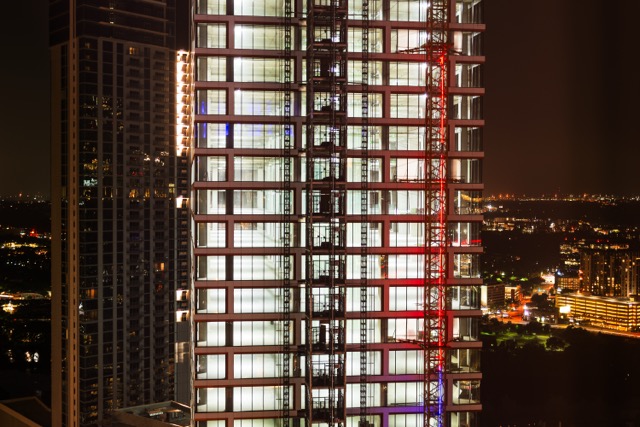
When a monsoonâlike downpour landed, the durability and IBIS of the camera shone through. I handâheld the S1â¯II for lowâlight honkyâtonk concert stills and evening architectural shots across the street from my hotel-all without a tripod.



Panasonic S1 II Workflow Tips
The S1 II menu labyrinth can overwhelm. I recommend:
- Menu Mapping: Spend an hour mapping your top five functions (e.g., burst mode, af sensitivity, video resolution) to custom buttons.
- Firmware Upgrade: Grab a huge update when it becomes available. If you choose the S1 II E version, you get Cinemascope and access to ARRI LUTs.
- Tutorials: Watch setup guides on YouTube. Even seasoned shooters will pick up timeâsaving tricks.

Once dialed in, the S1â¯II rewards you with rockâsolid reliability and proâgrade output-if you are willing to learn its quirks.
More S1 II Images